
Mobile repair shop software that keeps every phone, part and payment on record
RepairDesk Pro is mobile repair shop software for phone repair shops, mobile service centres and independent technicians. Book in a phone with its IMEI and condition, give it to a technician, use parts from your stock, record the customer's approval, then invoice, record the payment and hand it back, all in your browser.
Trial applications are reviewed before approval. Indian mobile numbers are verified with a one-time code (OTP); international applicants provide a valid mobile number.
A day in a phone repair shop, in RepairDesk Pro
A phone comes in over the counter, goes to the bench, picks up parts, gets a price the customer agrees to, and goes home paid for. Each of those steps is recorded in the same place.
1At the counter
Search the customer by name or phone; a returning customer’s earlier phones and repairs are already there. Record the phone’s brand, model and IMEI, its condition, the accessories left with you and the fault, and take an advance if you collect one. The customer signs on screen.
2On the bench
The job goes to a technician with a priority and an expected completion date. Diagnosis notes and photos stay with the job.
3Parts
Add the parts you fit from your stock. Stock goes down, and the repair charge updates with them.
4Approval
If the price changes, you tell the customer and record their decision. A repair can’t be completed above the amount they approved.
5Billing
Create the invoice from the job’s repair charge and record payments by cash, card, UPI, bank transfer or cheque.
6Collection
The customer signs for the phone at collection. If money is still owed, only a manager or owner can hand it over. Set a repair warranty period as you hand it back.
Customers and their phones
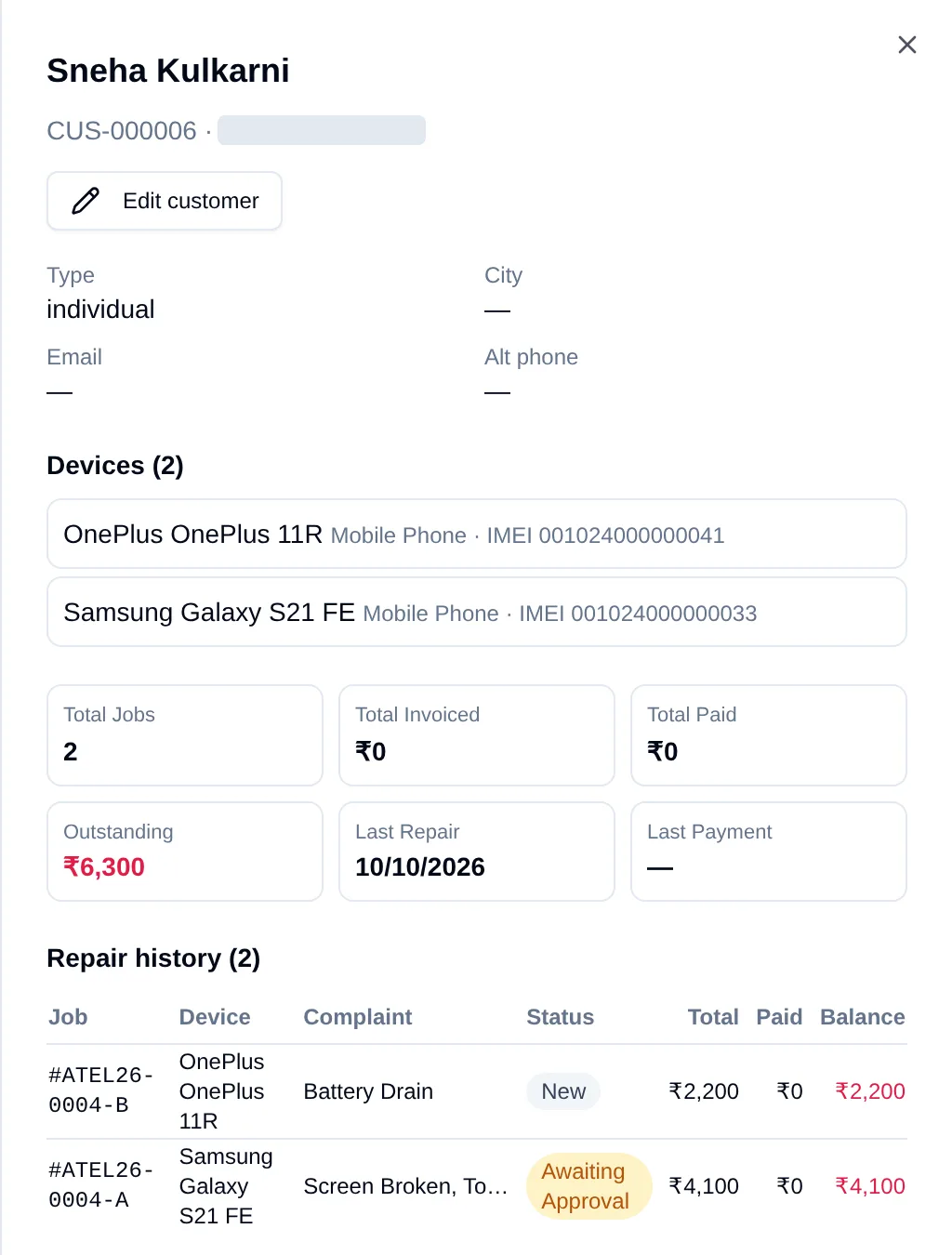
Repeat customers are the backbone of a phone repair shop. RepairDesk Pro keeps each customer together with every phone they have brought in and every repair you have done for them.
One customer, several phones
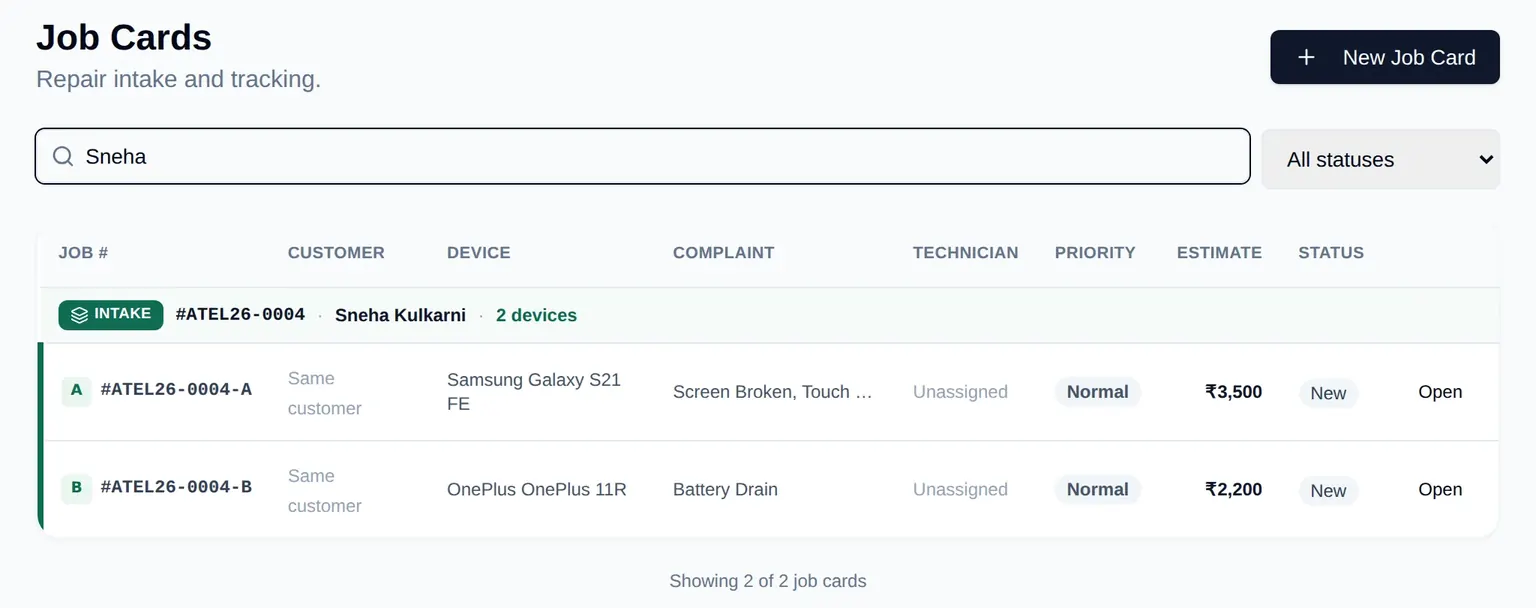
A customer's profile lists all of their devices with brand, model and IMEI. When they bring in more than one phone on the same visit, a single intake creates a separate job for each phone, numbered -A, -B and so on, up to 10 devices. How multi-device intake works on a job card
Repair history for every customer and every phone
The profile shows each repair with its phone, complaint, status, total, amount paid and balance, plus the customer's total jobs, invoiced, paid and outstanding amounts and the dates of their last repair and last payment. Each phone also keeps its own repair history, so a repeat fault on the same handset is easy to spot.
- Find a customer or job by name, phone number, job number or IMEI/serial.
- When you add a customer, RepairDesk Pro warns you if the phone number or email already belongs to an existing customer.
Phone intake built for the counter
IMEI, model and screen lock recorded safely
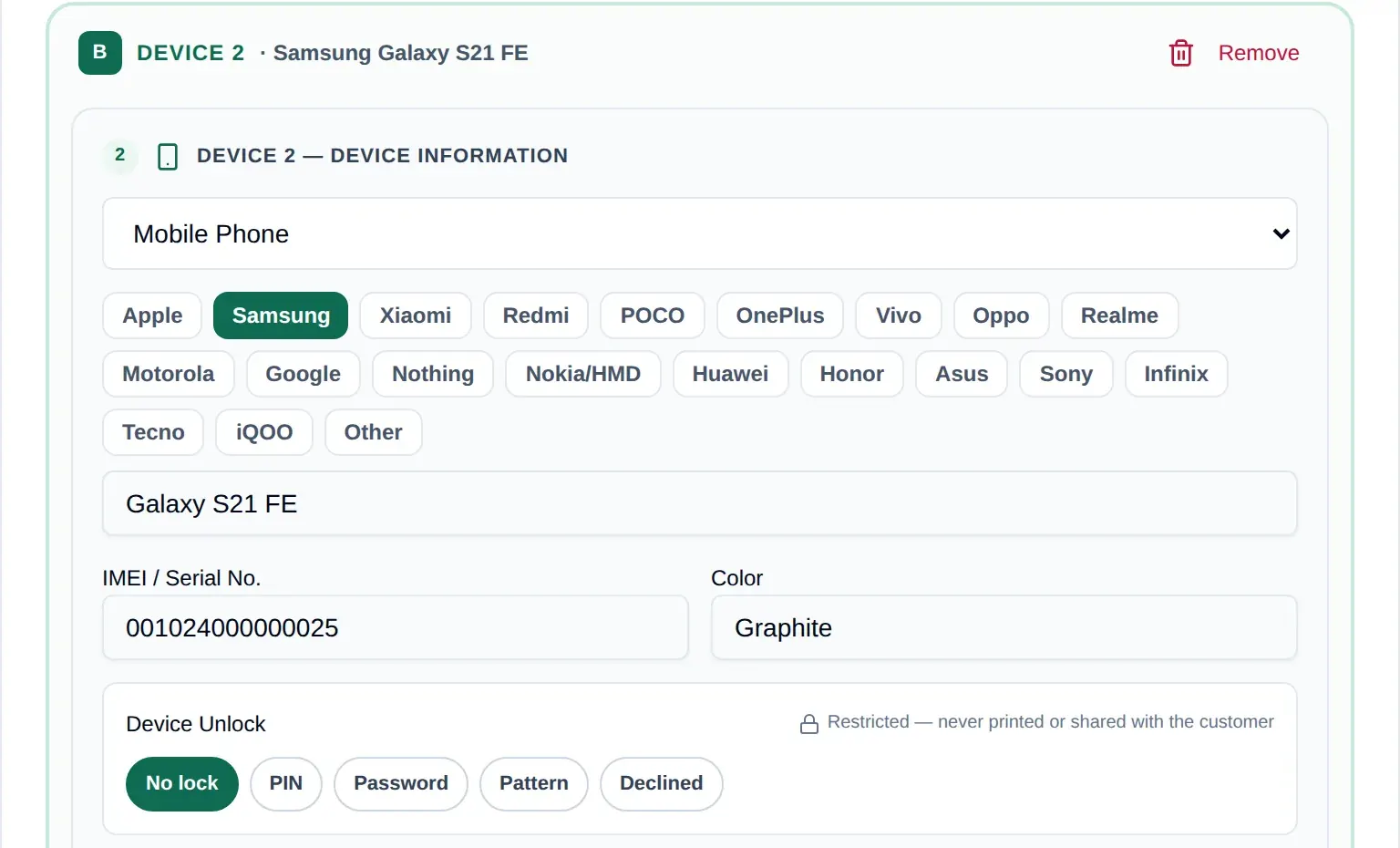
Pick the brand and model from the device catalogue and record the IMEI or serial number and colour. If you need the screen lock to test the phone, record the PIN, password or pattern: it is stored encrypted, a technician can see it only on jobs assigned to them, and every view is logged.
Condition and accessories checked before you take the phone
Note cracked glass, liquid damage and failed touch, camera, speaker or button checks, the battery percentage, and the SIM tray, case or charger left with you, so there is a clear record of the phone you received and what to hand back.
Technicians, priorities and the repair bench
At the bench, everyone needs to know which phone is next and what is holding a repair up.
Who is fixing what
Give each phone to a technician, reassign it when needed, and set a priority and an expected completion date.
Phones waiting on parts
Move a repair to Waiting for Parts while a screen or battery is on order, then back to In Repair when it arrives.
The right access for each role
Owners, store managers, counter agents and technicians each get their own login, and their role decides what they can see and do.
The job list can be filtered by status, technician or store, and every status change is kept on the job.
Repair parts and stock
Screens, batteries and charging boards are where a phone repair shop's money sits. RepairDesk Pro connects the parts you fit to the job and to your stock.
Parts used on a job come out of stock
- Add a part from inventory to a job: stock goes down in the same step and the job's repair charge is recalculated.
- A part can't be added when there isn't enough stock, and removing it from the job puts it back.
- No parts can be added once a repair is completed, so the bill can't grow after the customer approved it.
Reorder levels, vendors and purchases
- Set a reorder level for each item and see what is running low, with a suggested reorder quantity.
- Keep your vendors and record purchases of new stock.
- Stock adjustments are recorded, so you can see why a quantity changed.
There is no barcode scanning, and low-stock items are shown in RepairDesk Pro rather than sent as alerts.
Estimates and approvals when the price changes
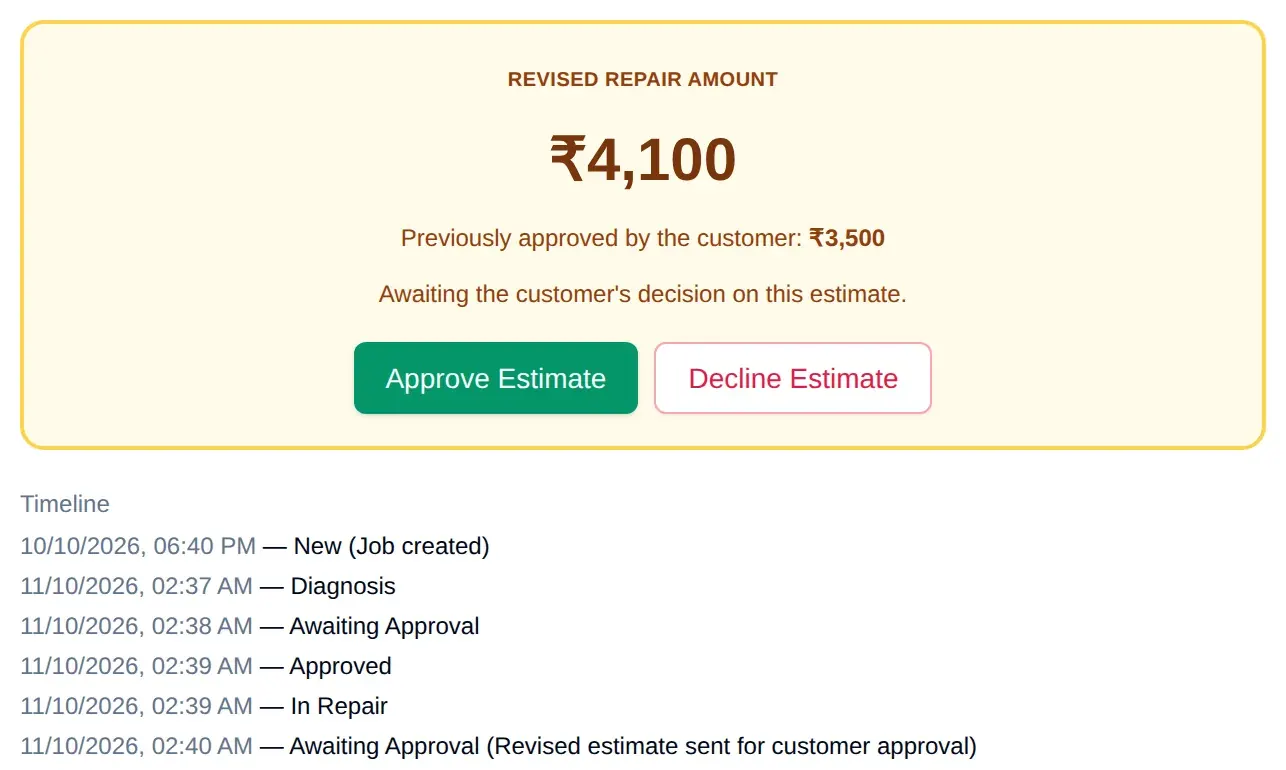
Estimates cover parts, labour, discount and tax. After diagnosis you discuss the price with the customer, and a staff member records their decision on the job. If the cost goes up during the repair, the job goes back for a new decision, and it can't be marked complete above the amount the customer approved.
Invoices, payments and handover
Getting paid for a repair, and knowing who still owes you, should not depend on a notebook by the till.
An invoice from the job's repair charge
Create an invoice for a job, pre-filled from its repair charge, with line items, a discount and a tax percentage. Invoices start as drafts and are then issued; an unpaid invoice can be cancelled. The printed invoice carries your business details and tax number, such as your GSTIN.
Advances, payments and refunds
Record an advance at intake and further payments later, by cash, card, UPI, bank transfer, cheque or other, with a reference. A refund is recorded as its own entry against the original payment, by staff allowed to issue refunds. Each job shows what has been paid and what is still outstanding.
No handover with money still owed
Before a phone is marked delivered, RepairDesk Pro checks the balance. If money is still owed, only a manager or owner can choose to hand it over anyway, and no phone is marked delivered without the customer's collection signature.
Repair warranty
Set a repair warranty period when the customer collects the phone. The job shows the date the warranty runs until, and the dashboard counts the repairs still under warranty.
RepairDesk Pro records payments; it is not a POS system, does not process card payments and does not send payment links. Invoices show a single tax line, without a CGST/SGST/IGST split.
Fewer “is my phone ready?” calls
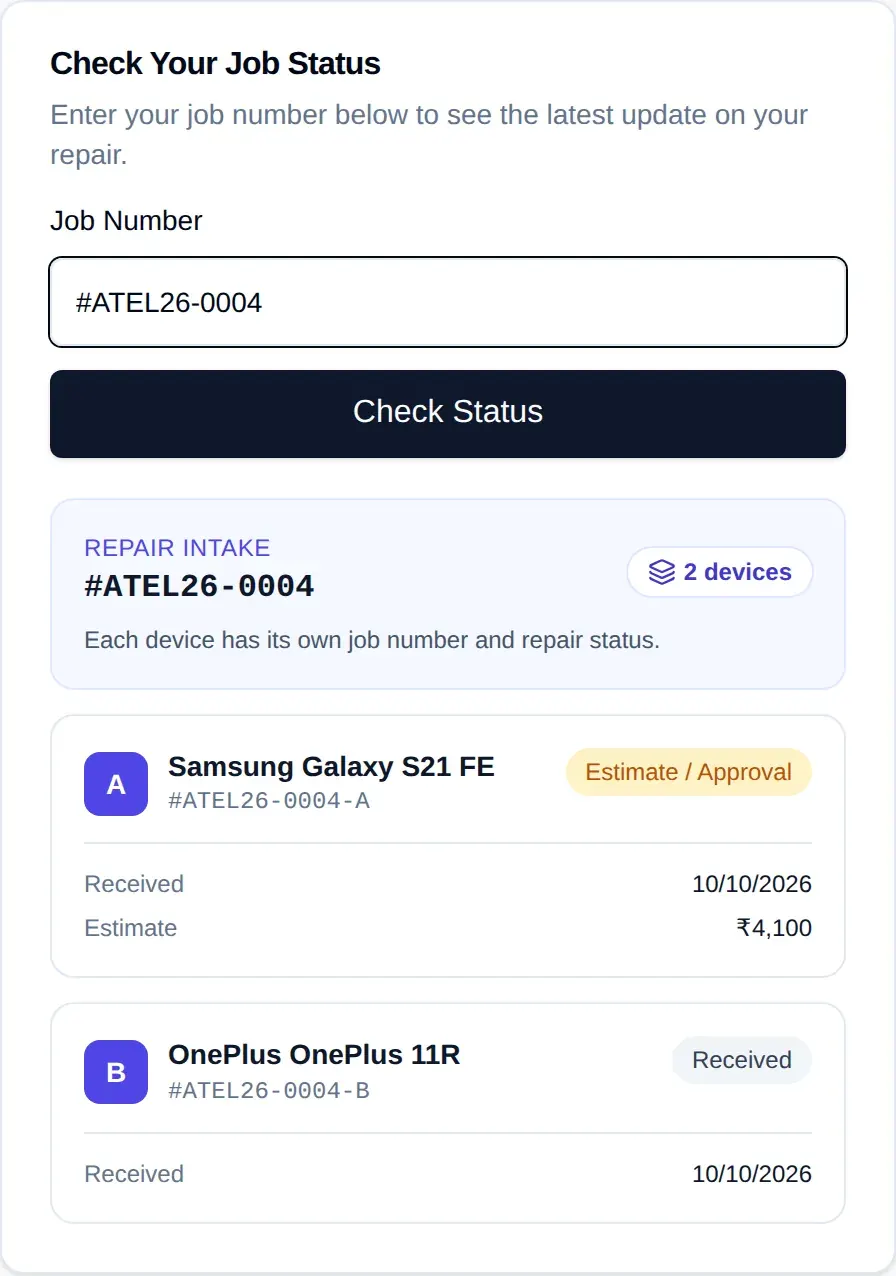
Hand the customer their job number at the counter. They can look it up on your Customer Status Page, without logging in, and see where their phone is: received, estimate and approval, work in progress (including when it is waiting for parts), ready for delivery or delivered, with any balance due.
If they left more than one phone, the base job number shows every phone from that visit. Customers check the page themselves; RepairDesk Pro doesn't send them messages.
Available on eligible paid plans
The Customer Status Page runs on your business's own subdomain, which our team configures on eligible paid plans. It isn't available during the free trial. See plans and pricing
Mobile repair shop management software for small and growing teams
- Start with one counter and add staff with their own logins and roles as you grow.
- Add branches on plans that include more than one store; staff work in the stores they have access to.
- Runs in a modern browser on a computer, tablet or phone, with nothing to install.
- The number of stores, users and job cards depends on your plan. See plans and pricing
Mobile repair shop software: frequently asked questions
What is mobile repair shop software?
Can I record a phone’s IMEI and screen lock?
Does it track spare parts stock?
Can I record payments against a repair?
Can a customer with several phones be handled together?
Do customers get SMS or WhatsApp updates?
Can repair shops outside India use RepairDesk Pro?
More questions? Contact us, read about RepairDesk Pro, or go back to the RepairDesk Pro home page.
Apply for a 5-Day Free Trial
Try RepairDesk Pro with your own counter and bench for 5 days. Tell us about your shop in a short application; when our team approves it, you'll get an email with a link to set up your shop's account.
Every application is reviewed by our team, and the trial starts only after approval and activation. Indian applicants verify their mobile number with a one-time code (OTP); applicants outside India provide a valid mobile number without OTP verification. No payment details are needed to apply.